

Table of Contents
Proofreading, as old as printing (dating back to the 15th century), has been an essential part of academic writing and continues to be so in the age of AI proofreaders. While authors were largely responsible for proofreading their own texts, somewhere around the 18th century, major printing presses used scholars and leading “men of letters” to proofread texts! Now let’s take a (rather big) leap to the 1990s. Did you know that the first grammar checker was created at the University of Pennsylvania in 1959? In 1993, Microsoft introduced AutoCorrect, and in 1995, Word 95 debuted real-time spell checking, with those familiar red squiggly underlines.
Each of these milestones nudged proofreading further away from being a purely human, manual task and closer to something assisted and automated. Now AI proofreading tools have entered the chat! Sophisticated AI proofreading software can do more than simply catch typos: they can understand context, flag stylistic inconsistencies, suggest discipline-specific vocabulary, and help researchers around the world produce publication-ready manuscripts with greater speed than ever before.
In 2026, advanced AI proofreading tools integrate seamlessly into workflows like MS Word, Overleaf, and Google Docs, offering real-time feedback on consistency, plagiarism risks, and readability. With such tools proliferating rapidly, every researcher today is grappling with the choice among the best AI proofreading tools. Here is a roundup of the best AI proofreaders 2026 has to offer.
Top 7 AI Proofreaders in 2026: Quick Snapshot
| Tool | Academic accuracy | Additional feature | Platform | Pricing |
| Paperpal | High accuracy Trained on millions of published research papers Preserves technical terms, academic tone | Consistency checks Journal submission checks Plagiarism detection AI detection Paraphrasing Citation generator Reference finder Chat with PDF AI writing assistance | Web, MS Word, Overleaf, Google Docs, Chrome | Free tier; Prime plan from $25/month (unlocks full AI writing toolkit) |
| Grammarly | Good general accuracy Strong plagiarism check Limited discipline-specific support | Tone detector Plagiarism checker Citation suggestions Sentence restructuring Fluency suggestions | Web, browser extension, Google Docs, desktop app, mobile | Free tier; Premium from $12/month |
| ProWritingAid | Detailed style reports Good for long-form writing | 20+ writing reports Readability analysis Integrations with Scrivener | Web, MS Word, Google Docs, Scrivener, desktop integration | Free tier; Premium from $10/month, Pro $12/month |
| Hemingway Editor | Readability-focused Limited grammar depth | Readability scoring Sentence simplification Bold/color highlighting | Web, desktop (Mac/PC) | Free (web); Desktop app $19.99 one-time |
| QuillBot | Good paraphrasing accuracy AI-powered rewriting | Paraphraser, sentence rearrangement Summarizer Citation generator Plagiarism checker Multilingual | Web, MS Word, Google Docs, Chrome extension | Free tier; Premium from $9.95/month |
| LanguageTool | Strong multilingual support Good grammar rules | Supports 30+ languages Style suggestions Browser extensions | Web, MS Word, Google Docs, browser extensions, API | Free tier; Premium from $5.83/month |
| Ginger | Beginner-friendly; decent general correction Weaker academic depth | Sentence rephraser Translation (60+ languages) Text reader | Web, MS Word, Chrome extension, iOS/Android | Free limited; Premium $7–14/month |
1. Paperpal
Paperpal is a trusted writing tool with an AI proofreader built specifically to polish academic and research writing. Developed by Cactus Communications, Paperpal’s AI has been intensively trained on millions of scholarly articles and refined by feedback from top editors across 1,300+ subject areas based on over 2.5 million hours spent enhancing papers for publishing. This empowers Paperpal to match its language editing and proofreading to the conventions and terminologies of scholarly communication.
Paperpal offers real-time grammar and language corrections calibrated to academic writing standards. Besides surface-level errors, it also detects inconsistent use of terminology, tense shifts in methodology sections, and informal tone. Paperpal provides the most accurate language correction for essays, theses, dissertations, and research manuscripts, with 2x the suggestions compared to more generic tools like Grammarly and ProWritingAid.
Paperpal Goes Beyond Language Checks for Academics
Paperpal includes a plagiarism checker, an AI detector, a paraphrasing tool tailored for academic text, submission readiness checks that evaluate manuscripts against journal guidelines, and much more. The proofreader is especially useful for students and researchers with English as a second language (ESL), offering targeted suggestions that improve academic fluency without altering the author’s original meaning (see Fig. 1).
Best for: PhD students, researchers, educators, healthcare and medical professionals, science journalists, and ESL academics.
Pros:
- Trained on academic literature for unmatched domain accuracy
- Available across multiple platforms, including Web, MS Word, Google Docs, Overleaf, and Chrome
- 100% secure with strong data privacy compliance
- Complete AI academic writing toolkit for researchers and PhD students
Cons:
- Less versatile for non-academic writing tasks
- Some advanced features locked behind the premium plan
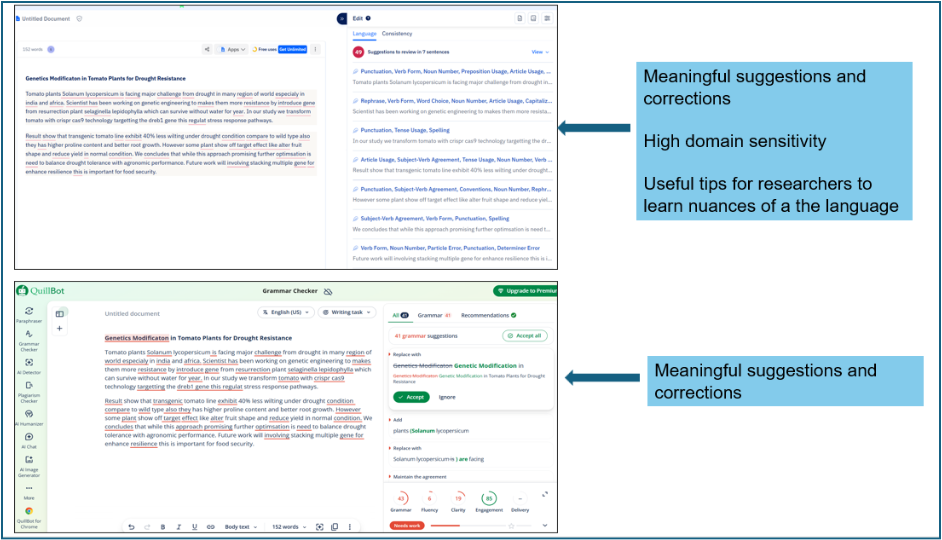
Figure 1. Performance of Paperpal (top) and QuillBot (bottom) on a sample text
2. Grammarly
Grammarly is one of the most widely recognized AI proofreaders and writing assistants in the world, used by more than 30 million people daily. While not built exclusively for academic writing, it offers a robust feature set that makes it a popular choice among students and researchers who want an easy-to-use proofreading tool.
Key features and accuracy: Grammarly’s AI engine provides real-time corrections for grammar, punctuation, spelling, and sentence clarity. Its premium tier adds style suggestions, vocabulary enhancements, and a tone detector. Accuracy is high for general English writing, but it lacks the discipline-specific calibration of tools like Paperpal.
Additional support: Grammarly includes a plagiarism checker that scans billions of web pages, citation suggestions, and genre-specific writing goals (including academic). Its browser extension integrates seamlessly into most web-based writing environments.
Best for: Undergraduate and graduate students, and academics who want a general-purpose writing assistant with a polished interface.
Pros:
- Excellent user interface and real-time feedback
- Broad platform support and browser extension
- Strong plagiarism checker
Cons:
- Not trained specifically on academic literature
- Premium pricing can be high for students
- Can over-suggest style changes that conflict with academic convention
3. ProWritingAid
ProWritingAid positions itself as a deep editing tool rather than a surface-level checker, offering more than 20 detailed writing reports that analyze everything from sentence length variation to overused words, readability, and pacing.
Key features and accuracy: Its grammar and style engine is solid, and its contextual thesaurus and readability analysis make it useful for long-form academic writing like dissertations and book chapters. The tool provides in-depth structural feedback that many other proofreaders don’t offer.
Additional support: ProWritingAid integrates with Scrivener, making it a favorite among authors who use that platform. It also supports academic writing style settings and has a robust learning center.
Best for: Academics working on long-form projects like dissertations, monographs, or book manuscripts.
Pros:
- Deep analysis beyond grammar, i.e., structure, style, and readability
- Scrivener integration is a standout feature
- Affordable premium pricing
Cons:
- Interface can feel overwhelming for new users
- Slower real-time feedback compared to competitors
- Less specialized for academic journal-style writing
4. Hemingway Editor
Among AI proofreading tools, Hemingway Editor takes a slightly different approach: instead of correcting errors, it focuses on improving readability by flagging complex sentences, passive voice, and unnecessary adverbs using a color-coded system (see Fig. 2).
Key features and accuracy: Hemingway assigns a readability grade level to your writing and highlights problem areas visually. While this approach is highly effective for journalistic or public-facing writing, it is less suited to academic writing, which often requires complex sentence structures and passive voice by convention.
Additional support: The tool is lightweight and distraction-free, which some writers appreciate. The desktop version allows offline use. There are no plagiarism or citation features.
Best for: Academics writing grant proposals, outreach content, or science communication pieces aimed at general audiences. It might be less useful for formal research papers.
Pros:
- Simple, visual interface
- Affordable one-time desktop pricing
- Useful for plain-language writing goals
Cons:
- No grammar correction in the traditional sense
- Penalizes writing styles that are normal in academic contexts
- No academic-specific features or integrations
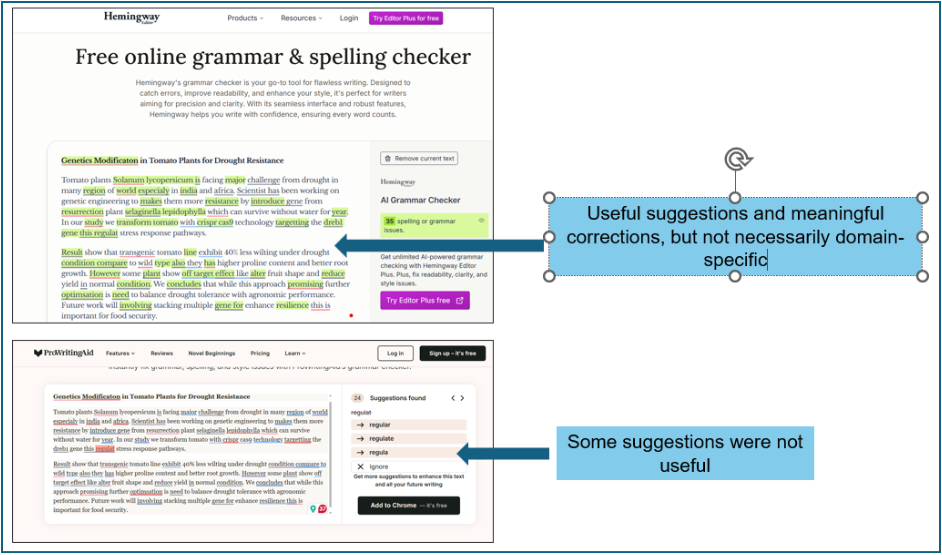
Figure 2. Performance of Hemingway Editor (top) and ProWritingAid (bottom) on a sample text
5. QuillBot
QuillBot started as a paraphrasing tool and has evolved into a multi-feature writing assistant and AI proofreader that includes a grammar checker, summarizer, citation generator, and plagiarism detector.
Key features and accuracy: QuillBot’s grammar checker is accurate and fast, and its paraphrasing tool offers multiple modes that allow writers to rephrase content while maintaining scholarly tone. The Academic mode is particularly useful for ESL researchers.
Additional support: The citation generator supports APA, MLA, and Chicago formats, and the summarizer helps researchers condense sources efficiently. The plagiarism checker integrates well with the overall workflow.
Best for: Students and researchers who frequently need to paraphrase sources, generate citations, or summarize academic papers.
Pros:
- Excellent paraphrasing tool with academic mode
- Integrated citation generator
- Strong value at the free tier
Cons:
- Grammar checker is less sophisticated than Grammarly or Paperpal
- Paraphrasing tool can sometimes alter meaning
- No discipline-specific language support
6. LanguageTool
LanguageTool is an open-source grammar and style checker that supports more than 30 languages, making it a standout choice for multilingual academic environments and international researchers writing in English as a second or third language.
Key features and accuracy: Its grammar rule engine is highly detailed and regularly updated by a community of linguists. The tool handles complex grammar rules well and offers style suggestions that can be customized for formal academic writing. Its multilingual capabilities are rated quite high among AI proofreaders.
Additional support: LanguageTool offers browser extensions, a desktop app, API access for institutional deployment, and integrations with MS Word and Google Docs. Its premium tier adds a “picky mode” for advanced style suggestions and personal dictionary support.
Best for: ESL authors, multilingual researchers, institutions looking for a secure and affordable proofreading solution.
Pros:
- Best-in-class multilingual support
- Privacy-focused with an offline option
- Affordable premium pricing
Cons:
- Interface is less polished than competitors
- Fewer academic-specific features
- Paraphrasing and plagiarism tools not included
7. Ginger
Ginger is a grammar and sentence correction tool that also includes a sentence rephraser, text-to-speech reader, and translation support for more than 60 languages. It is primarily aimed at everyday writing but has features that benefit ESL students and international academics.
Key features and accuracy: Ginger’s grammar correction is competent for general writing, and its translation feature is a useful bonus for researchers who work across multiple languages. However, its academic accuracy is limited compared to tools like Paperpal or even Grammarly, as it lacks domain-specific training (see Fig. 3).
Additional support: Ginger offers a sentence rephraser and a personal trainer feature that tracks your most common mistakes. Its mobile apps make it convenient for on-the-go writing.
Best for: ESL students and academics who need translation support alongside basic grammar checking.
Pros:
- Translation into 60+ languages
- Mobile-friendly with iOS and Android apps
- Personal error tracker for language learning
Cons
- Weaker academic accuracy compared to top-tier tools
- Fewer integrations with academic platforms
- Premium pricing seems high, given the limited feature set
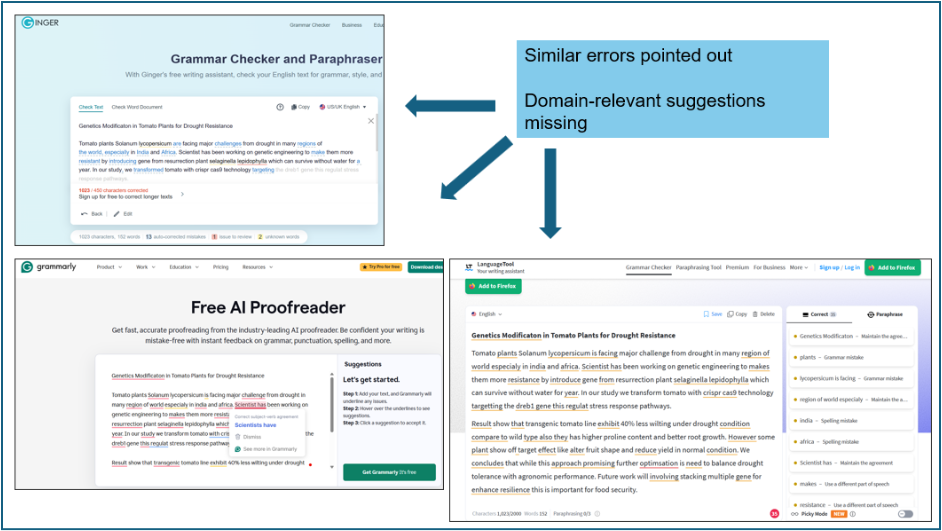
Figure 3. Performance of Ginger (top), Grammarly (bottom left), and LanguageTool (bottom right) on a sample text
How to Choose the Best AI Proofreader for Your Academic Writing
Various criteria may help a confused researcher make the right choice for a suitable AI proofreader for academic writing:
Accuracy and style suggestions: Prioritize specialized tools like Paperpal for academic-specific precision over general ones. Consider doing a quick test on your domain text to be sure.
Writing goals: For journal-ready papers, seek a tool with writing support and critical manuscript submission checks (Paperpal); for improving readability, prioritize Hemingway Editor; and for paraphrasing-heavy work, QuillBot might be a good bet.
Pricing: This is probably the most crucial determining factor, especially for early career researchers! Try to balance features vs. cost. Free tiers might suffice for light use. For unlimited checks, paid premium access will be necessary.
Security: Look for data privacy, which is critical for sensitive research. For this, Paperpal is your best friend as it never uses your data to train its AI models
Considering the above, Paperpal stands out as the best AI proofreader for academics as it is built specifically for scholarly writing and demonstrates high accuracy across platforms, with 100% secure processing.
Frequently Asked Questions
No, not entirely! AI proofreaders excel at grammar, style, and clarity but can miss nuanced academic issues like logical flow, citation accuracy, or discipline-specific terminology. Always review the output carefully.
Grammar checkers focus narrowly on syntax errors and basic rules (e.g., subject–verb agreement), while AI proofreaders offer broader edits such as style consistency, tone adjustment, sentence variety, and academic formatting. In that sense, an AI proofreading tool acts more like a comprehensive editor.
Yes. Paperpal stands out for academics with specialized features like manuscript templates, journal-focused checks, AI-driven academic phrasing, and plagiarism and AI detection tailored to research. Tools like Paperpal often outperform Grammarly’s general-purpose tools.
It depends on the tool. As a researcher, always check privacy policies to protect sensitive research and avoid free versions that train on your data. Ideally, researchers should opt for those with zero data retention policies.
Paperpal is a comprehensive AI writing toolkit that helps students and researchers achieve 2x the writing in half the time. It leverages 23+ years of STM experience and insights from millions of research articles to provide in-depth academic writing, language editing, and submission readiness support to help you write better, faster.
Get accurate academic translations, rewriting support, grammar checks, vocabulary suggestions, and generative AI assistance that delivers human precision at machine speed. Try for free or upgrade to Paperpal Prime starting at US$25 a month to access premium features, including consistency, plagiarism, and 30+ submission readiness checks to help you succeed.
Experience the future of academic writing – Sign up to Paperpal and start writing for free!
 Paperpal for China
 Paperpal for Korea
 Paperpal for Japan


 Speak to us