

Table of Contents
Jenni AI claims to be a fully integrated research, reference, and writing workspace purpose-built for students, academics, and professional researchers. Working with Jenni as a research assistant feels like having a word processor, ChatGPT, and a reference manager combined into one tool. However, Jenni AI’s quality of writing for academics has always been questionable compared to academic-specific AI writing tools like Paperpal.
In this in-depth Jenni AI review, we’ll explore the capabilities of the writing tool and also suggest better Jenni AI alternatives that you can actually use to supercharge your essays, thesis, research papers, and other academic content.
Disclaimer
This Jenni AI review is based on independent research and is intended to provide an unbiased comparison of various AI writing tools, including our own. While we strive to present accurate and up-to-date information, features, and pricing, we recommend checking directly with the respective companies for the latest details, as offerings may change over time. Additionally, any opinions expressed here reflect the author’s perspective and may not represent the official stance of the companies/tools discussed.
Paperpal vs Jenni AI: Quick Comparison
| Features | Paperpal | Jenni AI |
| Pricing | Monthly plan at $25 Yearly plan at $144 | Monthly plan at $30 Yearly plan at $144 (priced at $12/mo.) |
| Integration | Available on Web, MS Word, Google Docs, Overleaf, and Chrome | Accessible as a Web Importer to import references to Jenni |
| Language Editing | Corrects grammar and vocabulary errors, standardizes citations and tables, maintains spelling consistency for scientific terms, adapts to patient-first language in medical contexts | AI editing with grammar, spelling and vocabulary checks |
| Reference Checker | Upload your manuscript to identify retracted papers, broken DOIs, low-quality journals, and unsupported citations. Every reference is cross-checked against 250M+ articles to catch submission-critical errors. | Jenni AI doesn’t currently provide a dedicated reference checker for validating references. |
| AI Paraphraser | Paraphrase informal text to sound academic, trim text to reduce word count, and change tones in 10+ modes | Improve fluency, simplify wording, or paraphrase text |
| AI Writing | Expand ideas with context-aware text suggestions. Get supporting, implication, concluding statements counterarguments and more | Continue writing from your last sentence, helping users overcome writer’s block with fresh ideas |
| AI Reference Finder | Find answers to your research questions instantly, backed by 250 million verified papers. Explore relevant literature with full PDFs that strengthens your review | Jenni does not have a reference finder or literature search capability |
| AI Chat with PDF | Upload multiple PDFs to summarize, extract key insights, study highlights or methodologies in any language | Upload multiple PDFs to summarize or get a plain language breakdown |
| Plagiarism Check | 7,000 words for free, and 10,000 words with Paperpal Prime | Accessible only in the premium plan |
| Paperpal Library + Paperpal Agent | Store papers, PDFs, and notes in one place by importing from Zotero, Mendeley, or your files. Chat with saved papers, cite them directly into your draft, and let Paperpal Agent edit, translate, review, search the web, and work across your Library and up to 20 files – all in one conversation without re-uploading content. | Jenni AI does not offer a dedicated research library or a unified AI agent that works across saved papers, multiple documents, and integrated research workflows. |
| AI Detection + AI Disclosure Templates | Detects AI text generated from ChatGPT, Gemini, Claude and provides AI disclosure templates to add to acknowledgements sections | Detects AI text generated from various LLMs |
Jenni AI: Overview & Key Features
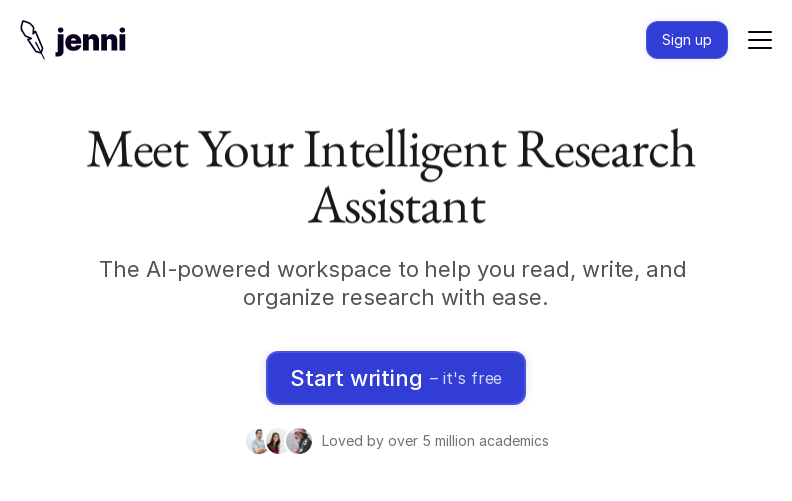
- AI Writing Support:
- Structure Generation: Create outlines, Smart Headings, or standard paper structures like IMRD formats with AI prompts. Jenni generates these suggestions based on papers uploaded in the user’s library and surfaces relevant themes
- AI Autocomplete: Jenni AI can continue writing from your last sentence, helping users overcome writer’s block with fresh ideas. It also suggests sentences as you write, a feature that can be toggled on or off to maintain control over your writing
- AI Paraphrasing: Highlighting a sentence brings up suggestions to simplify wording, improve fluency, or paraphrase it. It can also translate text into different languages
- AI Chat with PDFs: Jenni users can use AI chat within PDFs to get detailed explanations or summarize lengthy papers. You can upload multiple PDFs together to extract insights or get a plain language breakdown
- AI Editing: Jenni’s AI editing function helps add counterarguments when hovering over a statement. Review tools act as a writing coach, offering options like simplifying technical language, fixing grammar issues, and flagging redundant words. There’s also a built-in AI detection check
- Multilingual Support: Jenni.ai supports content generation in over 30 languages, including major academic languages like English, Spanish, German, French, and Chinese
- Reference Management:
- Automatic Citation: As users write, they can cite any paper from their uploaded library. The bibliography automatically updates in the background as citations are added. However, Jenni doesn’t allow searching for external sources within the platform itself
- Citation Style Flexibility: Jenni AI supports citation generation in over 2,600 referencing styles, including APA, MLA, Chicago, and Harvard, and was recently upgraded to include 1,700+ new styles

Why Students and Researchers Prefer Jenni AI Alternatives for Research?
Our Jenni AI review highlights its potential for improving research paper writing, but also reveals significant drawbacks. Jenni AI can produce text that closely resembles existing sources, risking detection by plagiarism checkers and potentially leading to serious academic consequences.
Many users and reviewers have noted that Jenni AI’s outputs sometimes lack depth, contain vague arguments, or even fabricate citations, requiring extensive human editing to ensure originality and accuracy.
Here’s a deeper insight into the pros and cons of Jenni AI:
| Jenni AI Pros | Jenni AI Cons |
| Jenni’s section-wise drafts, thesis statements, and structured outlines can easily accelerate getting from zero to a workable draft | Jenni is extremely weak on deep theorizing, critical analysis, and complex argument-building. It often leaves conceptual gaps or superficial arguments untouched |
| Insert in‑text citations and build reference lists in common styles (APA, MLA, Harvard) as you draft, so you do not have to manually format everything later | Jenni often creates incorrect, incomplete, or fabricated references, which is especially problematic for a tool marketed as an academic research assistant |
| You can upload papers, ask questions, summarize sections, and have Jenni help interpret figures or dense paragraphs to speeds up reading-heavy tasks like literature reviews | Jenni AI currently only supports PDFs in English and cannot interpret documents in other languages |
| Features like “Improve Fluency,” paraphrasing, and AI Edit can smooth awkward phrasing, fix grammar, and improve flow while keeping an academic tone | Jenni AI’s text outputs often seem bloated, unspecific, and sometimes factually incorrect. The final outputs need extensive human editing, especially for academic submissions |
Having second thoughts on using Jenni AI for research writing? Try Paperpal, it’s free.
Why Paperpal is the Most Preferred Jenni AI Alternative For Writing Research Papers?

Paperpal AI is trained on millions of published scholarly articles and 23 years of expertise in scientific, technical, and medical publishing. This extensive training enables Paperpal to grasp the unique nuances of academic writing, from patient-first language and consistent equation labeling to formal phrasing and discipline-specific terminology.
Let me walk you through how Paperpal becomes your complete research writing companion, from the first intimidating blank page to hitting “submit” with confidence.
Phase 1: Literature Review & Research Foundation
Starting your literature review? You’re probably staring at a pile of research papers, unsure what’s actually relevant or worried you’re missing something important. Paperpal helps you cut through the noise.
Ask your burning research questions and Paperpal searches through 250 million verified sources to surface accurate answers backed by the most relevant papers. Not just random results, papers that actually match what you’re trying to understand. Want to explore different methodologies? Compare theoretical frameworks? Narrow down to specific approaches? You can do all of this in one continuous conversation thread without starting over each time.
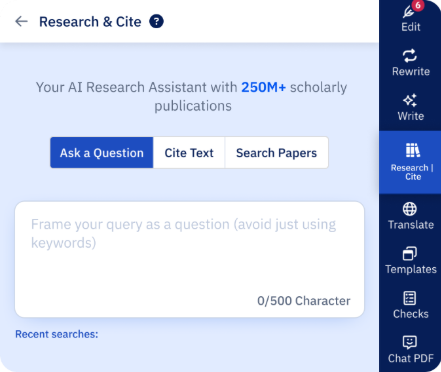
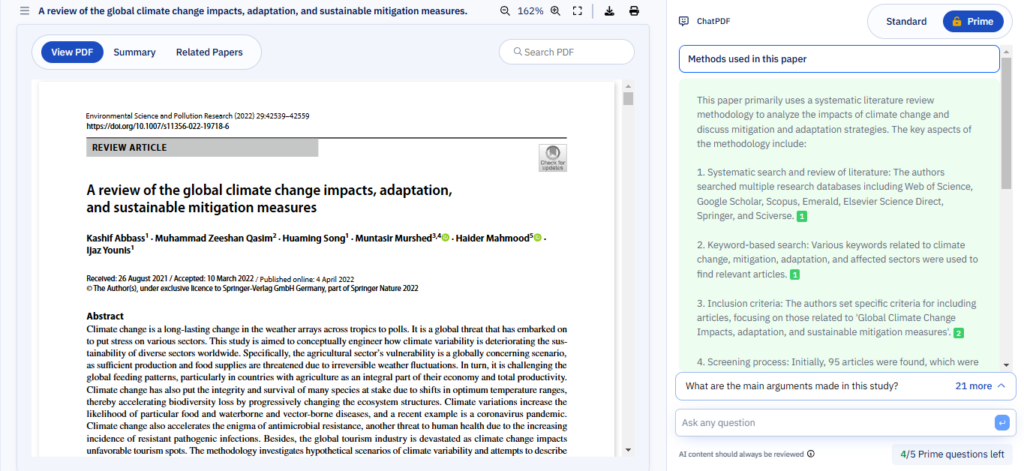
Extract summaries, key insights from multiple PDFs – Upload them or pull from Paperpal’s database and chat with them directly. Need to understand a complex methodology from that 40-page paper? Ask. Want to identify research gaps or understand limitations? Just chat. It’s like having a research assistant who’s read everything and can explain it clearly.
Phase 2: From Outline to First Draft
Now you understand your field, but staring at a blank document wondering how to structure everything? Paperpal gets you unstuck fast.
Start with a structured outline – Tell Paperpal your topic, add your key points, upload your notes or relevant PDFs, and get a tailored outline for your specific paper format—whether it’s an original research article, review paper, or thesis chapter.
Build on your ideas with contextual suggestions – You can expand on outline sections, convert those messy handwritten notes into coherent academic prose, or develop your rough ideas into polished paragraphs. Upload your department’s writing guidelines or related papers, and Paperpal Write gives you context-aware suggestions that actually fit your research. The conversation flows naturally, you’re not repeating yourself or losing context with each request.
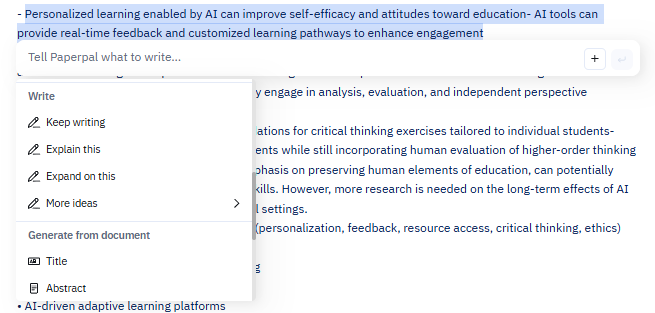
Need citations as you write? Paperpal helps you add appropriate references right where they belong, keeping your arguments properly supported from the start.
Phase 3: Refinement & Polishing
Your first draft is done, but it’s rough. Maybe some sections sound too informal, or you’ve used AI assistance and it doesn’t quite sound like you yet. This is where Paperpal Rewrite becomes invaluable.
Take control of your voice – Paraphrase informal text to sound more academic. Shorten those convoluted sentences your supervisor always flags. Adjust tone for your target journal. With 10+ rewrite modes, you’re directing the changes while Paperpal preserves your meaning and context—it brings out the best version of what you’re trying to say.
Polish every detail with Paperpal Edit – Paperpal Edit is the most accurate grammar checker built specifically for academic writing. It catches language errors, fixes punctuation, ensures consistency in your terminology, data formatting, and word forms. Those little inconsistencies that reviewers love to point out? Caught before submission.
Working with co-authors or need supervisor feedback? Share your document on Paperpal and collaborate in real-time. Everyone can write, review, and refine together, dramatically cutting down the endless email chains and version control nightmares. Faster collaboration means faster submission.
Phase 4: Pre-Submission Perfection
You think you’re done, but journals are notoriously picky. One more crucial phase before you submit.
Get instant peer-review-style feedback with AI Review – Receive practical suggestions on improving your arguments, addressing gaps, strengthening weak sections, all before a reviewer sees it. It’s like having a friendly reviewer who actually wants to help you improve.
Finalize your draft for submission – Paperpal’s Plagiarism Checker scans against 99 billion webpages and 200 million articles to catch any unintentional similar phrasing or synonym swapping. The AI Detector flags sections with AI-writing patterns so you can revise them to reflect your authentic voice and the Manuscript Checker runs 30+ language and technical checks that journals screen for on submission, catch these issues now rather than getting a desk rejection.
As a PhD student or researcher, you’re not juggling five different tools anymore. Paperpal takes you from “I need to understand this topic” all the way through to “I’m confident submitting this.” Literature review, drafting, polishing, collaboration, and submission checks, everything happens in one place, saving you time and reducing the cognitive load of managing multiple platforms.
You can focus on your research and ideas while Paperpal handles the heavy lifting of the writing process.
Experience the future of academic writing – Sign up to Paperpal and start writing for free!
Frequently Asked Questions
Yes, Jenni AI offers a Free plan that lets you test the AI tool before committing to Premium plans. Here’s what you can do with the free plan:
Experiment with AI autocomplete and paraphrasing
Add in-text citations to your writing
Try basic editing commands and auto-complete suggestions
Store up to 10 documents to organize early-stage work
Ask up to 10 AI chat questions total to explore the tool’s capabilities
Jenni AI allows to generate only 200 words of AI text per day, which means the Free plan works for exploring the tool or handling very light editing tasks, but won’t sustain active research writing or dissertation work.
Jenni AI’s Unlimited plan costs $12/month, which provides unlimited access to all features, including AI autocompletes, PDF uploads, AI edits, chat, and document export. For teams, universities, or research institutions, Jenni AI provides custom pricing plans with multi-seat discounts, dedicated support, analytics, and shared access. Promo codes are often available to further reduce the cost of paid plans.
While Jenni AI can act as a great starting point to overcome writers’ block with structure generation, AI chat with PDFs, and AI writing capabilities, there are some concerns when it comes to citations and preserving your original content.
Users report that Jenni AI silently modifies text without notifying or taking permissions from the user. This includes, minor wording alterations, significant paragraph revisions, and complete deletion of entire sections.
If accuracy and preservation of your original writing are critical (which they should be for any academic work), many users strongly recommend against using Jenni AI. The risk of silent, unauthorized changes that could compromise your academic integrity far outweighs any time-saving benefits.
For a safer alternative, try Paperpal. It protects your original work and ideas while providing transparent editing, every change is tracked and requires your approval, so you stay in complete control of your academic writing.
While tools like Scite (literature search), QuillBot (paraphrasing), and SciSpace (citation management) each serve specific functions, they require you to juggle multiple platforms throughout your research workflow.
For a comprehensive solution, consider Paperpal, an academic-focused AI tool built specifically for students and researchers. Paperpal consolidates your entire research workflow with capabilities like:
Literature discovery and management: Find relevant papers and build your reference list efficiently
Research synthesis: Summarize and extract key insights from multiple papers quickly
Academic writing assistance: AI writing support that aligns with scholarly language and scientific conventions, not generic content
Pre-submission checks: Integrated plagiarism detection, AI content detection, and comprehensive manuscript review to catch issues before submission
Discipline-specific accuracy: Understands the nuances of academic writing across scientific fields
Instead of switching between tools and risking inconsistencies, Paperpal provides an integrated environment designed around how researchers actually work, from initial literature review through final submission.
 Paperpal for China
 Paperpal for Korea
 Paperpal for Japan


 Speak to us