Table of Contents
The overwhelming volume of information that scholars must process daily has made the best AI summarizer tools more indispensable than ever. AI summarizers allow you to extract key insights from long documents to understand it better, so before committing to a focused read, you can determine the relevance of a research paper or a complex report.
Many believe that using summarizing tools is a lazy, shortcut approach to academic writing, but it is a skill to use them correctly and efficiently. A summarizing tool delivers considerable value when used responsibly to assess the relevance of a research paper before committing to a full read or to synthesize multiple sources into a coherent literature review.
As we move further into 2026, the best summarizer tool is one that doesn’t just shorten text but understands context and integrates seamlessly into your existing digital workspace.
Disclaimer
This article is based on independent research and is intended to provide an unbiased comparison of various AI writing tools, including our own. While we strive to present accurate and up-to-date information, features, and pricing, we recommend checking directly with the respective companies for the latest details, as offerings may change over time. Additionally, any opinions expressed here reflect the author’s perspective and may not represent the official stance of the companies/tools discussed.
Top 4 AI Summarizer Tools Compared
The following table provides an easy side-by-side comparison of the top AI summarizers to help you identify which tool best aligns with your specific research or writing needs.
| Tool | Best for | Supported formats | Key features | Ideal users | Platforms |
| Paperpal | Academic writing + summarizing research | PDF, DOCX, Web | Real-time grammar check, paraphrasing, citation support, plagiarism check, “Chat with PDF” | Researchers, PhD students | MS Word, Web, Google Docs, Chrome, Overleaf |
| Scholarcy | Literature reviews & skimming | PDF, Word, web articles YouTube | Summary flashcards, Robo-Highlighter™, reference extraction, library management | Students, librarians | Web, Chrome, Edge |
| Wordtune | Summarizing long-form text & rewriting | Web, PDF, YouTube | Sentence rephrasing, “spices” for facts, video summaries | Professionals, Bloggers | Web, Chrome, iOS |
| SciSpace | Understanding & summarizing scientific literature | PDF, URL | AI Copilot for math/tables, multi-language, citation search, AI Q&A on papers, literature search | Scientists, PhD students | Web, Chrome |
With these differences in mind, now let’s take a look at the specific strengths and weaknesses of each platform to see how they perform in real-world academic scenarios.
1. Paperpal
Paperpal is an AI writing assistant built specifically for academics. It integrates summarization directly into a broader academic writing workflow via AI chat with PDFs, where you can upload up to 10 documents and summarize the learnings from them.
Paperpal’s Chat PDF allows you to interrogate your documents, asking for specific data points or limitations within a study. Once you upload a PDF, you get a set of 21 questions for you to choose from (see Fig. 1a). You can come up with your own specific questions too, of course (see Fig. 1b). The outputs generated are not hallucinations as they are rooted in the PDF; you can find the exact spot where the answer was extracted from (see the circled numbers in Fig. 1b).
Pros:
- Summaries are tailored to academic standards.
- High-level security for sensitive research data.
- Cons:
- The free tier has daily usage limits on AI generation.
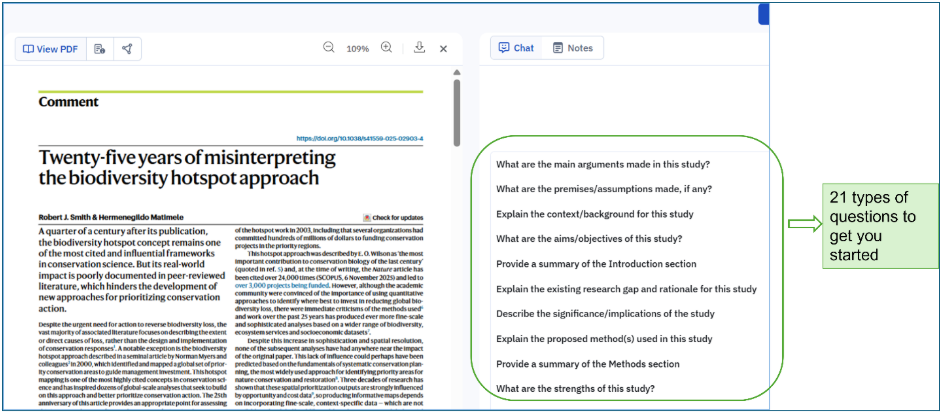
Fig. 1a “Chat with PDF” feature of Paperpal
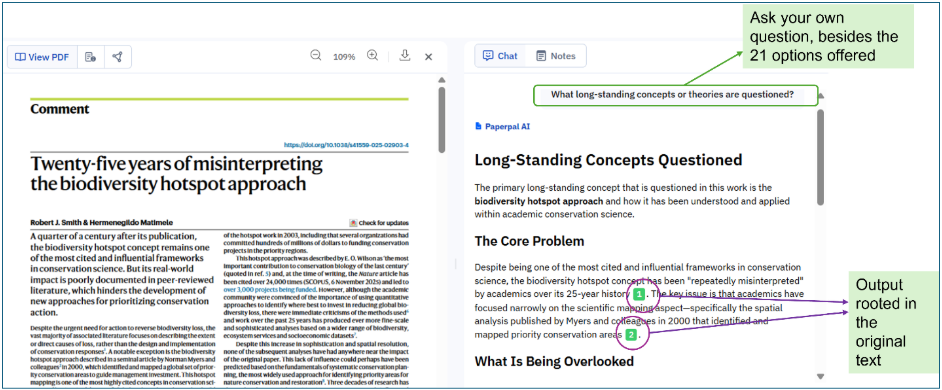
Fig. 1b You can be sure that the AI outputs are hallucination-free in the “Chat with PDF” feature of Paperpal
2. Scholarcy
Scholarcy remains the gold standard for “reading” tools. It takes a long-form PDF and breaks it down into structured “flashcards” containing the abstract, synopsis, and key highlights. In 2026, its ability to extract and summarize tables and figures has become remarkably precise.
Pros:
- Automated “Robo-Highlighter” finds the most important sentences instantly.
- Exports summaries directly to Notion, Zotero, or Obsidian.
- Excellent at summarizing YouTube lecture transcripts.
Cons:
- The interface can feel slightly data-heavy for casual users.
- Requires a subscription for unlimited “Library” storage.
3. Wordtune
Wordtune is considered the most “human-centric” tool on this list. Rather than just technical extraction, it focuses on readability. Its summarizer can take a complex article or a 20-minute YouTube video and provide a narrative-style summary that is easy to digest.
Pros:
- Extremely intuitive and sleek user interface.
- “Spices” feature adds citations and statistics to your summaries.
- Strongest performance for non-academic, general-purpose text.
- Cons:
- Sometimes lacks the “academic depth” required for highly technical STEM papers.
- Summary length control can occasionally be restrictive.
4. SciSpace
SciSpace (formerly Typeset.io) is a powerhouse for STEM researchers. Its AI Copilot can explain complex mathematical formulas and tables within a summary. If you encounter a dense section in a PDF, you can highlight it, and SciSpace will provide a simplified summary of just that specific part.
Pros:
- Context-aware AI that can “read” charts and formulas.
- Massive database of 280M+ papers to find related literature.
- Supports summarization in over 75 languages.
Cons:
- The “Copilot” can sometimes provide generic answers if the prompt is not specific.
- The premium version is relatively expensive compared to standalone summarizers.
How to Choose the Right AI Summarizer
With several strong options available, selecting the best summarizer tool for your academic workflow comes down to a few key considerations:
- Document format: If you primarily work with research PDFs, prioritize tools like Paperpal, Scholarcy, or SciSpace, which handle PDFs natively. For web articles and plain text, Wordtune excels.
- Source type: If you primarily use YouTube for learning, Wordtune or Scholarcy are better than Paperpal. For technical PDFs, SciSpace is superior.
- Output style: Do you need a structured table (Scholarcy), a narrative paragraph (Wordtune), or an interactive chat (Paperpal/SciSpace)?
- Discipline: STEM researchers will benefit most from SciSpace, while Paperpal and Scholarcy serve a broader range of academic disciplines.
- Depth of summarization needed: For quick relevance checks, Scholarcy’s flashcards are efficient. For deep interrogation of a single paper, SciSpace’s conversational AI offers more flexibility.
- Integration with writing workflow: If you need summarization alongside writing, editing, and grammar tools, Paperpal’s all-in-one platform is the most comprehensive option.
- Budget: All four tools offer free tiers, but power users will need paid subscriptions. Compare features-per-tier before committing.
- Platform and accessibility: If you need on-the-go summarization within your browser, look for tools with Chrome extensions.
- Privacy: For unpublished research, prioritize tools like Paperpal that offer enterprise-grade data security.
Using AI Summarizing Tools: Dos and Don’ts
AI summarizers are powerful aids, but using them effectively and responsibly requires some care. Here are key guidelines for students and researchers:
Dos:
- Use summaries as a starting point to decide whether a paper or document is worth reading in full, not as a substitute for reading it.
- Always cross-check specific numbers or statistics against the original document. Cross-verify key claims surfaced by the AI against the original source before citing them in your work.
- Use the best PDF summarizer tools to manage large volumes of literature during systematic reviews, accelerating the screening phase.
- Use AI text summarizers to condense your own draft content for abstracts, executive summaries, or literature review sections.
- Combine summarization tools with reference managers for an efficient end-to-end research workflow.
- Try different prompts. If a summary is too vague, ask the AI to “summarize the methodology specifically,” for example.
Don’ts:
- Never submit AI-generated summaries as your own written work without disclosure.
- Do not rely solely on a summary when the argument, methodology, or data of a paper is central to your research.
- Do not assume that all summarized information is accurate; AI tools can occasionally misrepresent nuanced arguments or omit caveats.
- Do not use summarization tools on confidential documents without verifying the platform’s data privacy policy. Use premium, secure versions for sensitive or proprietary information.
- Do not neglect to engage critically with primary sources. AI summarizers support, not replace, rigorous academic reading.
- Do not rely on AI for critical analysis. AI can summarize what was said, but it cannot yet evaluate the validity or bias of a study as well as a human.
In 2026, AI summarizers have become indispensable for anyone looking to manage information overload. These tools help researchers process information faster by stripping away the fluff and leaving behind the core evidence. Whether it’s Scholarcy’s flashcards or SciSpace’s data-aware Copilot, the goal is to enhance human intelligence, not replace it. Tools like Paperpal take this a step further by integrating summarization directly into the writing process, ensuring that your research is not only understood quickly but also communicated effectively.
Frequently Asked Questions
An AI summarizer is a tool powered by Large Language Models (LLMs) that analyzes a long piece of text and condenses it into a shorter version. The best AI text summarizer identifies the main arguments and conclusions while maintaining the original context.
In 2026, the best PDF summarizer options include Paperpal for structured, academic-specific insights and Scholarcy for flash card summaries. SciSpace is also highly rated for TD;LR summaries.
Yes, tools like Wordtune and Scholarcy can process YouTube URLs or transcripts to provide a written summary of video-based lectures, making them an excellent best summarizer tool for modern students.
Paperpal is a comprehensive AI writing toolkit that helps students and researchers achieve 2x the writing in half the time. It leverages 23+ years of STM experience and insights from millions of research articles to provide in-depth academic writing, language editing, and submission readiness support to help you write better, faster.
Get accurate academic translations, rewriting support, grammar checks, vocabulary suggestions, and generative AI assistance that delivers human precision at machine speed. Try for free or upgrade to Paperpal Prime starting at US$25 a month to access premium features, including consistency, plagiarism, and 30+ submission readiness checks to help you succeed.
Experience the future of academic writing – Sign up to Paperpal and start writing for free!
 Paperpal for China
 Paperpal for Korea
 Paperpal for Japan


 Speak to us