

Table of Contents
Every document or research paper that refers to previously published literature should include all citations in a reference list or bibliography for readers to ensure transparency, validity, and credibility of the research. However, searching for and organizing these citations into a specific format, especially for lengthy research papers, could be very time-consuming and effort-intensive.
This is where citation generators1 can be used effectively and efficiently because they allow writers to generate citations and develop bibliographies much faster than doing it manually. Citation generators are tools or programs that can quickly convert information about a source into a properly formatted citation and then collate all citations into a bibliography. Typically, users would need to specify the settings, such as the formatting style, which they need in their document. Some popular citation generators include Paperpal, Scribbr, MyBib, Citation Machine, and Cite This For Me.
This article explains how citation generators work, their benefits, and how to use them effectively. In addition, the article will also compare some popular citation generators to help you choose the best tool for your research.
Top 5 Citation Generators: Feature Comparison
The following table provides a brief comparison of different parameters for five commonly used citation generators.2 Further details are provided in the subsequent sections.
| Parameter | Paperpal | Scribbr | MyBib | Citation Machine | Cite This For Me |
| Key features | Research & Cite: Find articles by title, DOI or keyword and cite accurately. Get science-backed answers from 250M+ research articles and save to built-in citation library. Access one-click citation generation with instant style switching. Find related reads for your topic | Autocite: Search for citations by title, URL, ISBN, or DOI; Change reference formatting to match your document style; Chrome extension; organization tools; lets you create separate reference lists for each document; secure backup | Generates citations for books, journals, websites, and videos; search by title, URL, ISBN, or other identifiers; No ads, privacy trackers, or usage restrictions | Citations in multiple styles; builds bibliographies quickly; extensive citation guides; one-click formatting to convert references into different styles | Automatic citation generation for 34 source types; collaborations with others by sharing bibliography |
| Supported styles | APA, MLA, Chicago, Harvard, IEEE and 10,000+ other styles | APA, MLA, Chicago, Harvard, & many others | APA, MLA, Chicago, and 9,000 more | APA, MLA, Chicago, and 7,000 more | APA, MLA, Chicago, Harvard, and 7,000 more (paid) |
| Output formats / platforms | Web editor, MS Word | MS Word, LaTeX (BibTeX), Chrome extension | MS Word, Google Docs | MS Word, Google Drive | MS Word, BibTeX, Google Drive, Browser extension |
| Additional features | All-in-one tool for writing, paraphrasing, editing, with checks for plagiarism, AI detection, journal submission | Offers separate tools for writing, paraphrasing, proofreading, and plagiarism and AI detection checks | “Fix All” AI feature to automatically correct errors in generated citations | Plagiarism checker, writing assistant, paraphrasing tool, citation guides | Add bibliographies and image citations |
| Pricing | Free: Unlimited citation generation, limited Chat with PDF, 5 uses/day of research Q&A, among other free features Prime: Unlimited use of research Q&A, citation generation, and Chat PDF with full access to its comprehensive features ($25/month) | Customized, need to contact them | 100% free tool | Free: Basic features available Citation Machine Plus: Full access to all features (US$ 9.95 /month after a 3-day free trial) | Free: Only Harvard style, save citations only for 7 days Premium: All styles, no ads, plagiarism detection, always save citations ($9.99/month) |
We will now review these five citation generators and discuss their key features and functioning, and their pros and cons.
1. Paperpal
Paperpal is a comprehensive AI writing toolkit intended to provide overall support to users throughout their research writing process. Paperpal has a few unique features that can support you in different ways.
Paperpal’s free citation generator is integrated into its writing workflow and can help you find and cite sources in 10,000+ styles, such as APA, AMA, MLA, Chicago, to name a few. Simply search for a paper, save relevant references to your citation library, then select the source you want to include, choose the appropriate style, and click to cite it correctly in your paper as you write.
Research: Paperpal helps you search for references from its repository of 250M+ verified research articles, including peer-reviewed papers, open-access articles, preprints and much more, with 5,000+ articles added every day. You can search by DOI, title, or keyword to get the right reference or ask and get factual responses grounded in the most relevant research, with links to the original source.
Chat PDF: This feature allows you to upload up to 10 PDFs to extract insights or compare methodologies collectively. You can also ask questions in any language and get accurate answers marked with citations. This feature can help by creating insightful summaries across PDFs, including comparative tables and literature matrices, helping save time and effort.
Figures 1 to 4 show how Paperpal can help you search for a citation based on the input text and then cite it at the correct position in your document.
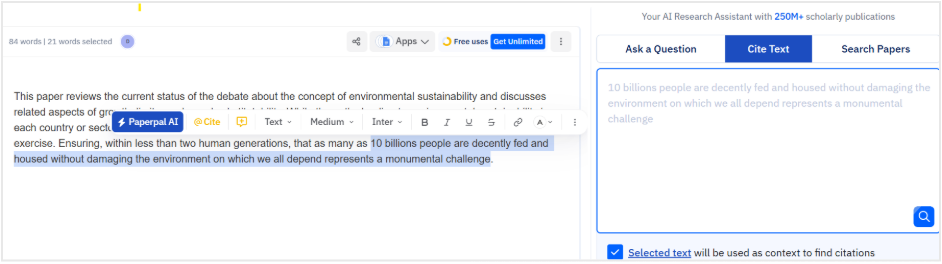
Figure 1: Selected text on Paperpal’s interface (left) is used as context to find citations
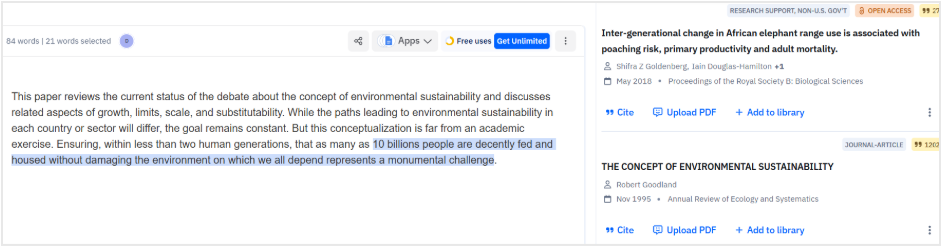
Figure 2: Related citations displayed on the right
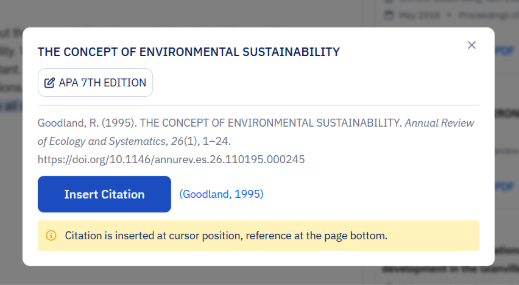
Figure 3: Preview of selected citation. Users should review this citation and then click on “Insert Citation.”

Figure 4: Citation inserted at the appropriate position in the text
Here are a few pros and cons of Paperpal.
Pros:
- Available completely free with unlimited citation generation, even on the free plan.
- Access to repository of 250M+ verified research articles, updated daily.
- Integrated citation library, which helps you organize your references.
- High accuracy in formatting (ensures consistency between in-text and full citations) and sourcing (draws from verified academic papers).
- Context-aware search helps find relevant, up-to-date literature quickly, reducing plagiarism risks and improving credibility.
- Intuitive interface with one-click generation and insertion; easy to switch between citation styles in minutes.
- Lets you select sections or paste text in editor to find the most relevant citations.
- Prime plan comes with access to full suite of research and writing tools.
Cons:
- Automatic formatting of full reference lists available with Prime plan.
- Primarily academic-focused, so it may not excel with non-research sources (books, news sites, etc.).
- Slight learning curve for new users, especially if unsure about using academic tools.
2. Scribbr
Scribbr2 is a comprehensive tool that can help students and researchers by offering several services such as citation generation, plagiarism checking, citation checking, and proofreading. The Scribbr Citation Generator is developed using the open-source Citation Style Language (CSL) project. It is most suitable for students and academic researchers working on dissertations and research papers and who need accurate citations and proofreading. Figure 5 shows a screenshot of Scribbr’s citation generator.
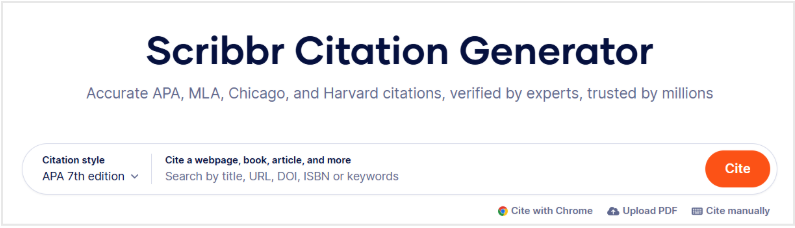
Figure 5: Scribbr’s citation generator
Pros:
- Citation generator is free and supports multiple citation styles, making quick referencing easy.
- Enables export of reference lists to MS Word or in BibTeX format for use in LaTeX editors like Overleaf.Provides a comprehensive academic toolkit with several services.
Cons:
- Pricing may vary depending on service selected. Since it is not clearly mentioned on the website, you would need to contact them for this information.
- Focuses on academic writing, so may not be as helpful for business or creative writing.
3. MyBib
MyBib is a 100% free citation and bibliography generator designed for researchers who need accurate references quickly. Figures 6, 7, and 8 illustrate the steps required to generate and download citations in your chosen format (as shown on their website).
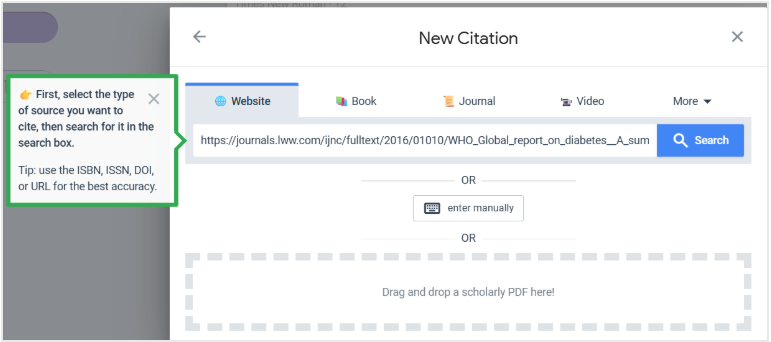
Figure 6: Step 1 – Selecting the source type
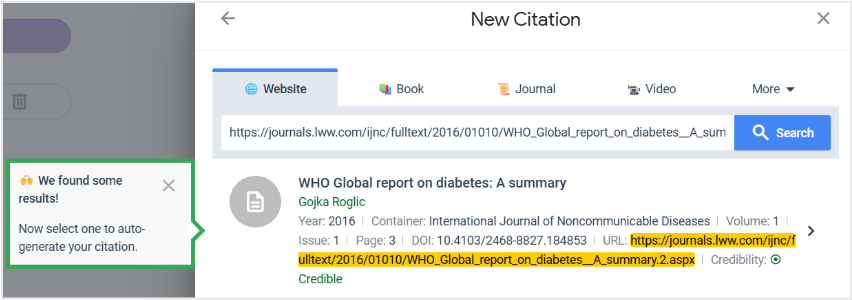
Figure 7: Step 2 – Selecting sources to auto-generate citations
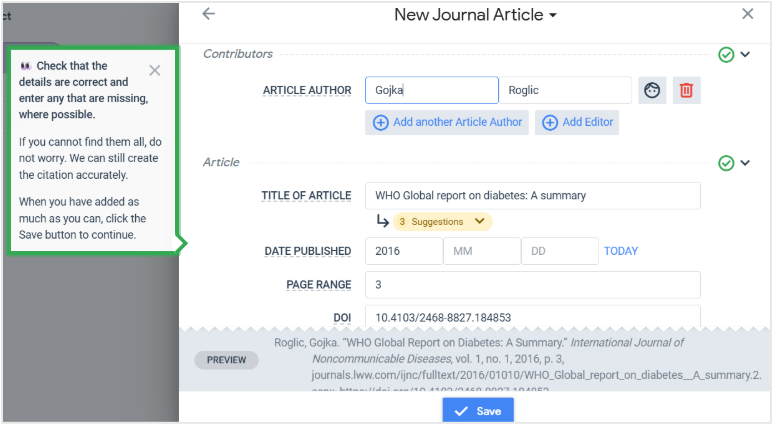
Figure 8: Step 3 – Saving the citations. After clicking on “Save,” the completely formatted citation gets added to your list.
Here are a few pros and cons of MyBib.
Pros:
- The tool is free with no restrictions. You can generate unlimited citations for free.
- You can create citations for multiple sources like books, journals, websites, videos, etc.
- Simple search and input options using title, URL, ISBN.
Cons:
- Lacks advanced citation management features, so organizing references can be difficult.
- Internet connectivity may be required for accessing their database so offline work is difficult.
4. Citation Machine
Citation Machine2 is a reliable citation generator that covers the commonly used academic styles (APA, MLA, Chicago, Harvard). It is best for academic writers who are writing long research papers and need to create extensive bibliographies.
Here are a few pros and cons of Citation Machine.
Pros
- Allows quick and comprehensive citation and bibliography generation.
- Allows switching citation styles without having to rebuild references, which is helpful when the references need to be used across different disciplines.
- Offers extensive citation guides.
- Offers access to grammar and plagiarism tools (premium version).
Cons
- Citations may need to be reviewed carefully.
- Some features may require account creation or subscription for complete access.
- Some tools are web-only so cannot be used for offline citation work.
5. Cite This For Me
Cite This For Me is a popular online citation generator that helps students add citations and create fully formatted bibliographies in minutes. It supports referencing for various types of sources, including TV shows, social media, etc.
This citation generator has most of the common pros of such tools, such as supporting multiple citation styles and allowing users to switch between styles.
Here are a few cons of the generator.
- The generated citations require manual review to ensure ordering and formatting accuracy.
- The website is not adapted to mobile devices.
- The free version provides access to formatting in limited styles but includes ads; advanced features are available only with a paid subscription.
What to Look for in a Citation Generator?
Here are a few considerations to look for when choosing the right tool for your research:3
- Functionality and features: While all tools offer citation generation, other tools may offer more comprehensive support such as plagiarism checking and grammar checking. In addition, if required, you could look for the types of additional features offered to streamline your research and writing.
- Ease of integration: If you use platforms such as MS Word and Google Docs, check if the citation generator offers plug-ins, which could enable you to generate citations as you write, without the need to switch between applications.
- Supported citation styles: Most citation generators offer several styles to choose from; however, check if you need to pay to have access to all styles. If you work across multiple disciplines or switch formats frequently, it would be helpful to choose a generator that supports several styles.
- Collaboration features: Some tools offer real-time collaboration with peers and sharing files. This is important if you work in a team and need to share your work.
- Offline vs online use: Some tools can be accessed offline and are helpful for users who do not have constant access to the Internet.
- Budget: Some citation generators offer many services with their free version and provide additional features that can be accessed with a paid subscription, so check and choose a tool depending on your budget and needs.
- User friendliness: Some generators have an easy interface with instructions while others may need slightly more effort to generate citations. Since your main aim is to generate citations quickly, ensure that you select a tool that is easy for you to use.
Considering the reviews of five citation generators, Paperpal stands out as the optimum choice for users who are looking for an end-to-end support for their research writing. Paperpal has several features such as Research & Cite, Chat PDF, etc., which can help in searching for, extracting, and citing research. In addition, Paperpal also offers accurate grammar checking, writing and paraphrasing, and plagiarism and AI detection among other research-focused checks to ensure that your final document is submission ready.
Frequently Asked Questions
All citation generators follow a few basic steps, as listed below:1
1. The citation generator receives information about a source, which is input by the writer. The information includes author names, article title, publication date, and other such details required by the format.
2. The generator processes this information according to user-specified settings and puts the information in the correct format. 
3. The generator produces citation(s) in the form of a text in the appropriate style, and this text can be copy-pasted into your article or paper; tools like Paperpal allow you to automatically insert citations into your writing as you work.
AI citation generators are a time-saving tool and generate citations quickly. They can support several different types of citation styles and typically are able to correct random input errors. However, they may occasionally generate hallucinated, inaccurate, or fabricated citations and may not always be able to identify uncommon source types.
Manual citations, on the other hand, are very time-consuming because writers would have to format every citation by themselves and ensure that they are consistent, complete, and error-free. However, this process can provide writers with an accurate understanding of citation styles.
Here are a few tips that can help you use citation generators wisely.1
– To avoid user error, make sure that your input information is correct, such as author name, spellings, punctuation, medium, edition, etc. Generators may not necessarily fix these errors.
– Use reputable, accurate sources to ensure credibility of your work.
– Re-check the generated citation to ensure no random errors have been introduced.
– Ensure that you select the correct settings or citation styles before generating the citations.
Free citation generators like Paperpal are accurate for academic writing. However, it is always advisable to cross-check generated citations to ensure that they are in the required format and have the correct details. A first step toward that would be to ensure that the information that is input is correct.
ChatGPT is an AI chatbot developed by OpenAI. While it is very good for generating ideas, writing and editing, summarizing content, and similar tasks, it is not appropriate for generating accurate citations. It is not very good at source verification and may hallucinate or fabricate citations, rendering it unreliable for academic research.
Paperpal is the best citation generator for students because in addition to generating citations easily, it offers comprehensive support in the entire research writing process with various features such as grammar checking, plagiarism checking, Chat PDF, etc. The interface is also user-friendly and can be used across various platforms, including Web, MS Word, Google Docs, Overleaf and Chrome.
I hope this detailed article, which focuses on five most commonly used citation generators and presents a comparative analysis across several parameters, can help you decide which tool would be the most appropriate for your research writing needs. All the best!
Paperpal is a comprehensive AI writing toolkit that helps students and researchers achieve 2x the writing in half the time. It leverages 23+ years of STM experience and insights from millions of research articles to provide in-depth academic writing, language editing, and submission readiness support to help you write better, faster.
Get accurate academic translations, rewriting support, grammar checks, vocabulary suggestions, and generative AI assistance that delivers human precision at machine speed. Try for free or upgrade to Paperpal Prime starting at US$25 a month to access premium features, including consistency, plagiarism, and 30+ submission readiness checks to help you succeed.
Experience the future of academic writing – Sign up to Paperpal and start writing for free!
References
1. Using citation generators responsibly. Purdue University. Accessed February 15, 2026. https://owl.purdue.edu/owl/research_and_citation/using_citation_machines_responsibly.html
2. Best 8 AI citation generators for students in 2025. Samwell.ai. Updated November 26, 2025. Accessed February 16, 2026. https://www.samwell.ai/blog/best-ai-citation-generators-comparison
3. Bouchrika I. 13 Best bibliography maker tools for 2026: Online and plug-in citation generators. Research.com. Published January 5, 2026. Accessed February 18, 2026. https://research.com/research/best-bibliography-maker-tools#5
 Paperpal for China
 Paperpal for Korea
 Paperpal for Japan


 Speak to us