


Table of Contents
A good reference management tool keeps your library organized, your citations accurate, and keeps your workflow seamless. Two names come up consistently in this space: Zotero and Mendeley. The Zotero vs Mendeley debate has run for years, with advocates on both sides.
As academic workflows become more complex, the question researchers are increasingly asking is whether a standalone reference manager is enough at all. The growing shift toward integrated academic writing ecosystems like Paperpal reflects a broader need for tools that support the entire research lifecycle.
So, what is the best reference management software for you? This article will bring you closer to the answer!
Zotero vs Mendeley as Reference Managers: Quick Comparison
| Zotero | Mendeley | |
| Ownership | Open source, non-profit, community-driven | Proprietary, owned by Elsevier since 2013 |
| Free storage | 300 MB (paid plans available) | 2 GB |
| First impression | Functional rather than sleek; takes new users a moment to learn | Feels intuitive out of the box, library, PDF viewer, and metadata all in one view |
| Browser capture | One-click connector; cleaner metadata from JSTOR, PubMed, Google Scholar | Browser extension available; occasional manual correction needed |
| Library organization | Nested collections, granular tags, manual control | Automatic grouping by author, year, journal; less customizable |
| Search at scale | Full-text search; slight edge for large, cross-disciplinary libraries | Full-text search; some users report slowdown at scale |
| Citation styles | 9,000+ | 7,000+ |
| Word integration | Yes, reliable plugin | Yes, via Mendeley Cite |
| Google Docs integration | Yes | Limited |
| PDF annotation | Multi-color highlights, notes panel (since v6), gap with Mendeley has narrowed | Highlight, underline, strikeout, freehand drawing; still the more built-out reader |
| Discovery / social features | None | Recommendation engine, academic social network |
| Group libraries (free) | Up to 100 members, granular view/edit permissions | Up to 25 members, with discussion boards and file sharing |
| Cross-device access | Needs sync set up once; reliable after | Cloud-first; works across devices with no setup |
| Institutional licensing | Common in academia, rarely bundled | Strong institutional partnerships (Mendeley Institutional Edition) |
| Mobile apps | Yes (iOS/Android) | Yes (iOS/Android) |
| Best fit | Researchers who want customization, control, and large or complex libraries | Researchers who want a ready-made setup and PDF-centric reading |
What is Zotero?
Zotero is a free, open-source reference management tool that helps researchers collect, organize, cite, and share research sources. It works as a desktop application with browser extensions for Chrome, Firefox, and Safari, and lets users capture references directly from web pages, databases, and library catalogs. Zotero stores everything locally, with optional cloud sync, and integrates with Word and Google Docs for in-text citation and bibliography generation.
Users can store PDFs, take notes, tag items, and sync libraries across devices (Figure 1a). Its Word and Google Docs plugins make citation insertion straightforward, and it supports thousands of citation styles through its built-in style repository. Zotero’s signature feature is its one-click capture of bibliographic information from library catalogs, databases, and journal websites (Figure 1b).
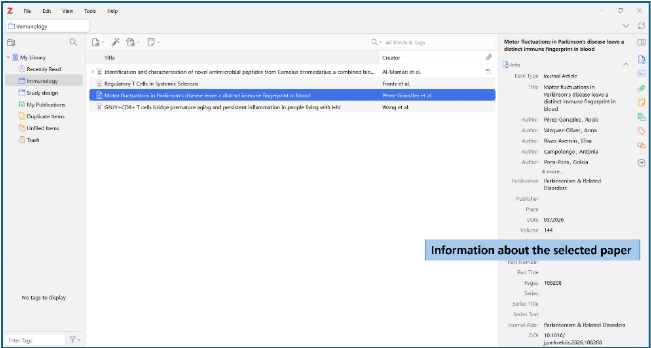
Figure 1a: Zotero desktop interface showing its three-panel layout: library collections, items, and item details
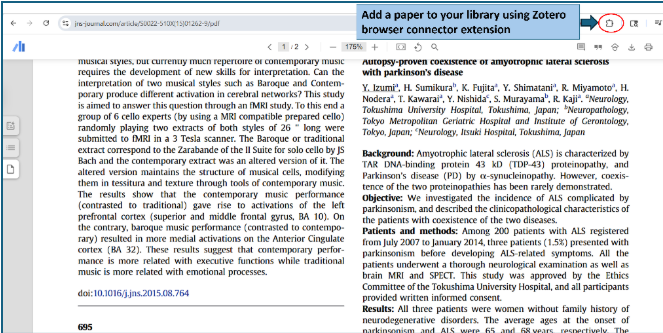
Figure 1b: Zotero’s browser connector allows you to add a paper to your library with a single click
What is Mendeley?
Acquired by Elsevier in 2013, Mendeley is a proprietary reference manager and academic social network. It offers desktop applications for Windows, macOS, and Linux, along with mobile apps and web access. Mendeley emphasizes PDF management with built-in annotation tools, automatic metadata extraction from PDFs, and a recommendation engine that suggests relevant papers.
Its Word and LibreOffice plugins enable citation insertion, and it provides 2 GB of free cloud storage. It offers a desktop app, a web interface (Figure 2), and browser extensions. Mendeley also functions as a research discovery platform, letting users follow researchers, explore trending papers, and access Elsevier’s content ecosystem. Like Zotero, it integrates with Word for citation workflows.
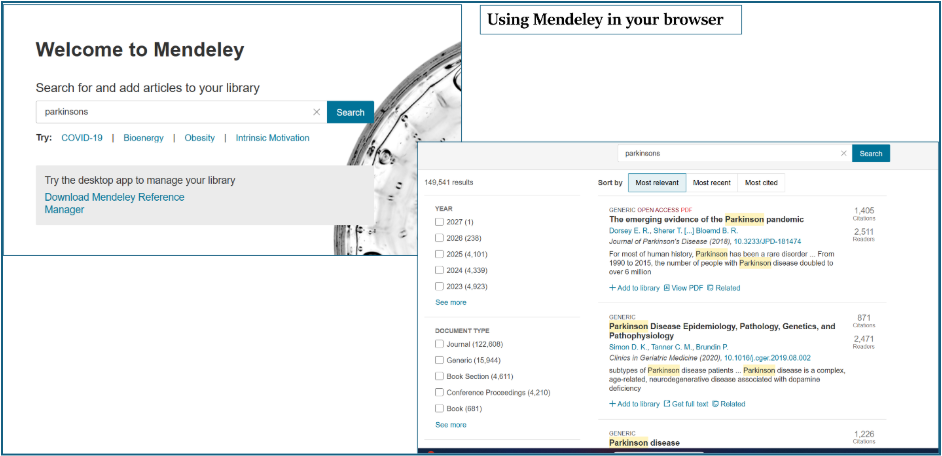
Figure 2: Mendeley for browsing articles in your web browser
Why Researchers are Looking Beyond Traditional Reference Managers
Despite their strengths, both Zotero and Mendeley are primarily reference managers, and reference management is only one part of the academic writing milieu. The prominent gaps are as follows:
- No built-in academic writing assistance. Neither Zotero nor Mendeley helps you draft, structure, or refine your manuscript. You capture and organize references in one tool, then switch entirely to a word processor to write, which interrupts flow.
- No plagiarism or AI detection workflows. As journals are increasingly scrutinizing submissions for plagiarism and AI, researchers have to resort to third-party tools (Turnitin, iThenticate, etc.).
- No submission-readiness tools. Neither tool handles journal formatting, supplementary file management, cover letters, author contribution statements, etc.
Journals want tighter formatting and language standards. Institutions want clarity on AI use, and researchers are under more pressure to publish, often across more venues, in less time. None of that is a reference management problem, but it’s the reason a good reference manager increasingly isn’t enough on its own.
Zotero and Mendeley solve the first mile: finding, storing, and citing a source. The drafting, checking, and formatting, which happens after that leads to opening three or four other tools and carrying your organization with you by hand. That handoff is where most research time actually disappears.
Paperpal Library: One Workspace, From First Source to Submission
Does every writing session start with the same clutter: a PDF reader for notes, a dozen browser tabs for research, your reference manager, Word, and a writing assistant, all open at once? That constant switching doesn’t just slow you down. It breaks your focus, making it harder to retain context and produce a strong draft.
Paperpal’s Library brings all these disjointed processes together into a single, connected workspace. Every document you create, every file you refer to, and every reference you save, whether on Paperpal or elsewhere, can now live in your Library: neatly organized, searchable, and accessible. Whenever you sit down to research or write, all your past work is right there, so you never have to rebuild context from scratch.
Once you’ve imported your sources into the Library, here’s what changes:
- Save a source, and it’s ready to cite. No re-searching for it three drafts from now.
- Open a chat with any saved PDF. Ask it questions, pull a quote, leave yourself a note, all inside the same library entry.
- Start a draft, and your folders come with you. Pull any collection as live context instead of re-explaining what you’ve already read.
- Generate your bibliography in one click, built from sources you’ve already saved, not ones you re-enter at the last minute.
- Write with context. Add your guidelines, reviewer notes, or an outline, then draft with Paperpal Agent with complete context on your research. Suggestions come grounded in the sources you’ve actually read, and citations get inserted accurately across 10,000+ styles as you write, not added afterward.
- Submit with confidence. Before it goes anywhere, run your manuscript through plagiarism, AI detection, reference, and grammar checks, plus a journal-fit check against the language and formatting standards of 1,500+ top journals indexed in Scopus and Web of Science (30+ pre-submission checks in total).
You don’t have to give up what you’ve already built to get there. Export your existing Zotero or Mendeley library as a .bib, .ris, or .csl file, and it imports straight into Paperpal, ready to cite and use as context while you write. Your original library stays exactly where it is.
That’s the actual gap between a reference manager and Paperpal Library: Zotero and Mendeley are excellent at organizing what you’ve found. Neither knows what to do with it once you sit down to write. Library is the part where your organization stops being a filing system and starts being the thing your draft is actually built from.
Zotero and Mendeley remain strong traditional reference managers with dedicated user bases. For researchers whose needs are limited to collecting references and generating citations, either tool can serve well. The choice often comes down to personal preference for open-source vs proprietary, or annotation needs vs simplicity.
However, modern research workflows require more than reference management. Cohesive research workspaces like Paperpal are better suited for researchers who want support beyond storing and citing references. Paperpal’s end-to-end workflow, writing assistance, plagiarism and AI detection, and submission-readiness tools address the fragmentation inherent in using standalone reference managers.
Frequently Asked Questions
Yes, both Zotero and Mendeley offer free versions. Zotero offers 300 MB of free cloud storage, with paid plans for more space; the desktop app itself has no cost. Mendeley provides 2 GB of free cloud storage with its standard account. Neither of the tools charges for its core reference management features.
The best reference management software depends on what you need it for. Zotero is a strong pick if you need it open-sourced, excellent browser captures, and reliable Google Docs integration. Mendeley suits researchers who want a polished, cloud-first interface within the Elsevier ecosystem.
However, the “best reference manager” assumes reference management is the finish line. It isn’t: those sources still have to become a draft, get checked for language and originality, and get formatted for submission. That’s what Paperpal Library adds. Import your existing Zotero or Mendeley library (via .bib, .ris, or .csl export), and every source becomes something you can chat with, cite in one click, and pull as live context while you write, run checks, and prepare for submission, all in the same workspace.
Zotero is widely recommended for thesis writing due to its strong citation style support, reliable Word and Google Docs plugins, and ability to organize complex libraries across multiple research areas. Mendeley works well for thesis writers too, particularly where institutional access is provided. For thesis writers who also need writing assistance, grammar checks, and plagiarism detection, platforms like Paperpal provide end-to-end support that standalone reference managers lack.
Before Library, a source had to be found and entered again each time you needed it. With Library, a source you save once stays cite-ready for the life of the project, and your bibliography builds itself from what’s already there. The citing experience doesn’t change. The re-finding and re-entering disappears.
No. Your Zotero or Mendeley library can stay exactly where it is. Export it as .bib, .ris, or .csl and import it into Paperpal alongside what you’re already working on, so it’s usable for citing and writing without you rebuilding anything.
 Paperpal for China
 Paperpal for Korea
 Paperpal for Japan


 Speak to us