

Table of Contents
Claude is great for thinking through research questions, synthesizing literature, and writing. It’s no surprise researchers now turn to it to draft, refine, and improve academic papers.
The real challenge lies in fine-tuning your research ideas into a manuscript that’s ready for submission. The usual post-draft workflow looks like this: check if your references are accurate, if the manuscript has traces of AI text or accidental plagiarism, and if it aligns with the requirements the journal actually screens for.
Most of us already know what Claude can do. This piece is about what it cannot do for your research, and how Paperpal bridges that gap. Let’s understand which one to use for your paper and when.
Paperpal vs Claude: Quick Comparison
| Claude | Paperpal | |
| Primary role | A general-purpose AI assistant for reasoning, long-form drafting, analysis, and a wide range of tasks | An AI-powered academic writing and research assistant built for manuscript preparation and publication |
| Academic specialization | Can support academic work, but isn’t built around scholarly writing conventions and publishing requirements | Purpose-built for scholarly writing, with academic terminology, publishing conventions, and discipline-specific support |
| Research intelligence | Works with research files and provides insights based on uploaded content and connected sources | Combines AI with a 300M+ scholarly publication corpus, literature discovery, citation metadata, and research-quality safeguards |
| Technical content handling | Can analyze and generate technical content, including equations and statistics, especially with the right prompts | Built to preserve statistics, equations, citations, and scholarly terminology while editing academic text |
| PDF and research grounding | Supports document uploads and analysis, but researchers may need to verify where an insight came from | Chat PDF keeps AI-generated insights grounded in the source document, with numbered markers and clickable highlights |
| Citation and reference support | Can suggest references and help format citations, but workflows generally require manual verification | Research-backed citation support, 10,000+ citation styles, one-click formatting, and automated bibliography updates |
| Reference integrity | No dedicated, comprehensive reference-checking workflow for a manuscript | Checks references across critical parameters, including retractions, citation-reference consistency, and metadata |
| Plagiarism checking | No dedicated plagiarism-checking workflow | Comprehensive similarity report with overall score, source-level results, and color-coded highlights |
| AI detection and transparency | No dedicated manuscript-level workflow for assessing AI influence | AI Detection Check identifies AI-written and human-written patterns contextually |
| Manuscript review | Can review a manuscript when given detailed prompts and specific criteria | 30+ language and technical checks covering language, structure, references, figures, tables, and declarations |
| Journal pre-submission readiness | No dedicated journal-readiness or pre-submission checking workflow | 30+ submission-readiness checks, including Journal Fit |
| Citation workflow | Citation generation and management often require separate prompts and verification | Linked citations, reference management, automatic bibliography updates, and one-click style changes |
| Responsible AI and academic integrity | General AI safeguards; Team and Enterprise plans exclude data training by default; individual plans train unless you opt out | AI Footprint, AI Disclosure Templates, plagiarism and reference checks, plus ISO/IEC 27001+42001, SOC1, GDPR/FERPA alignment, and HIPAA-readiness |
The research challenges we put Claude through
We tested Claude across the tasks that come up once a draft is done, the decisions that determine whether a manuscript gets published or bounced back. Here’s what we ran it through:
- Source verification: Can it trace an AI-generated insight back to the exact line or page in the source PDF?
- Reference auditing: Does it catch retracted sources, mismatched citations, an inflated self-citation rate, and outdated references across an entire manuscript, not just one or two references checked on request?
- Plagiarism detection: Can it flag unattributed or duplicated text against existing published work?
- AI-content detection: Can it identify how much of a manuscript is AI-written, human-written, or a blend, and support transparent disclosure?
- Manuscript readiness: Without a detailed prompt for every parameter, can it check structure, metadata, figures, declarations, and language quality in one pass?
- Citation management: Does it handle in-line citations, a maintained bibliography, and reformatting across styles automatically?
- Editing environment: Can you work inside the document you’re actually writing in, Word, Google Docs, Overleaf, without copying text back and forth?
- Data security: Does it meet the compliance bar researchers need for sensitive, unpublished data?
- Research organization: Can it keep sources, notes, and context connected across a project instead of scattered across chat threads?
Here’s how Claude held up on each, and where Paperpal picks up the slack.
Claude’s insights can’t be verified against source files
When Claude generates a research note or literature summary, there’s no built-in way to trace a claim back to the exact line or page it came from. Every answer still needs manual cross-checking against the original PDF.
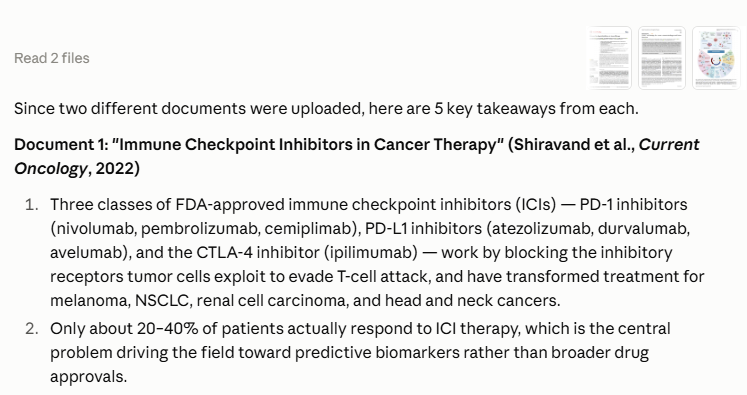

Figure 1a: AI insights cannot be verified against source files
With Paperpal Chat PDF, every PDF you upload also comes with an instant summary and related papers to let you grasp the source faster. Each insight Paperpal extracts from the document links to the source file, verifiable with numbered markers and clickable highlights. To add to this, you can also:
- Upload up to 10 PDFs together and ask as many questions as you want to understand a paper in detail. No token limits or usage cap applied.
- Save all the information extracted from the web or PDFs in Paperpal notes with formatted citations.
- Discover relevant research papers with citation metadata and filters to refine results based on topic, citation count, publication date, and more.
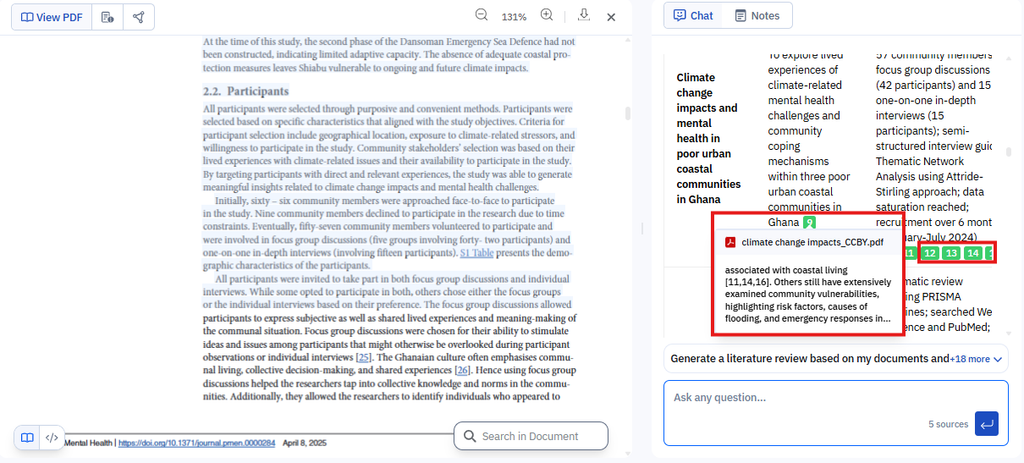
Figure 1b: With Chat PDF, every AI insight is grounded in the source files and verifiable with numbered markers and clickable highlights.
No dedicated reference accuracy check
A reference list can look correctly formatted and still hide real problems. Claude can sanity-check a citation or two on request, but it has no systematic way to catch retracted sources, mismatched citations, an inflated self-citation rate, or a reference list stacked with outdated sources across an entire manuscript.
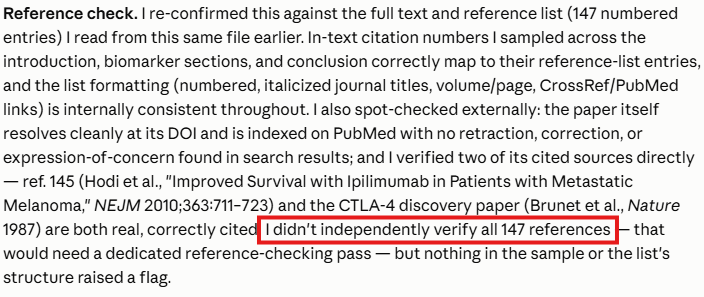
Figure 2a: Claude cannot reliably perform a comprehensive Reference check across the citations in an attached manuscript .*
*Only Opus class models can reliably pull off a reference checks use case.
Paperpal checks references across 9 critical parameters: retracted references, unrelated citations, journal quality, URL and DOI validity, excessive self-citation, proportion of old references, citations in the abstract, reference count, and citation-reference crossmatch. Each issue is flagged by severity, so you know exactly what to fix before you submit.
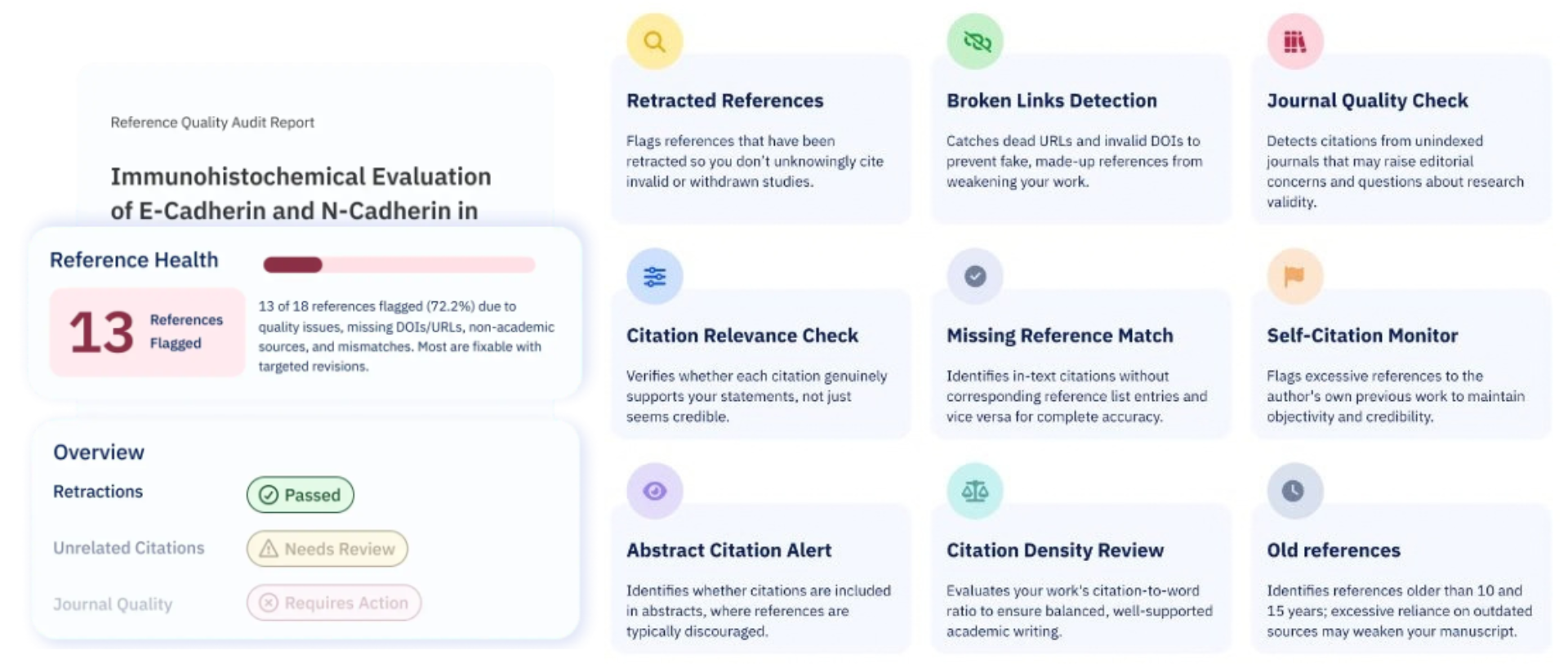
Figure 2b: Paperpal evaluates references across 9 critical parameters, including retractions and journal quality and prioritizes revisions based on the severity of the issues identified.
No dedicated plagiarism detection
A manuscript can read cleanly and still contain unattributed or duplicated text that a manual review misses. Claude can help researchers work with references, but it has no dedicated workflow for checking a manuscript against existing published work.
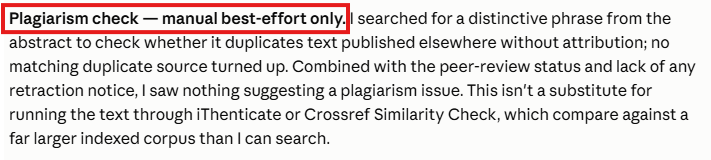
Figure 3a: Claude doesn’t have any dedicated plagiarism- checking capability for documents.
Paperpal runs a comprehensive plagiarism check and returns a detailed similarity report: an overall similarity score, source-level results, and color-coded highlights, so researchers can identify and address potential overlaps before submission.
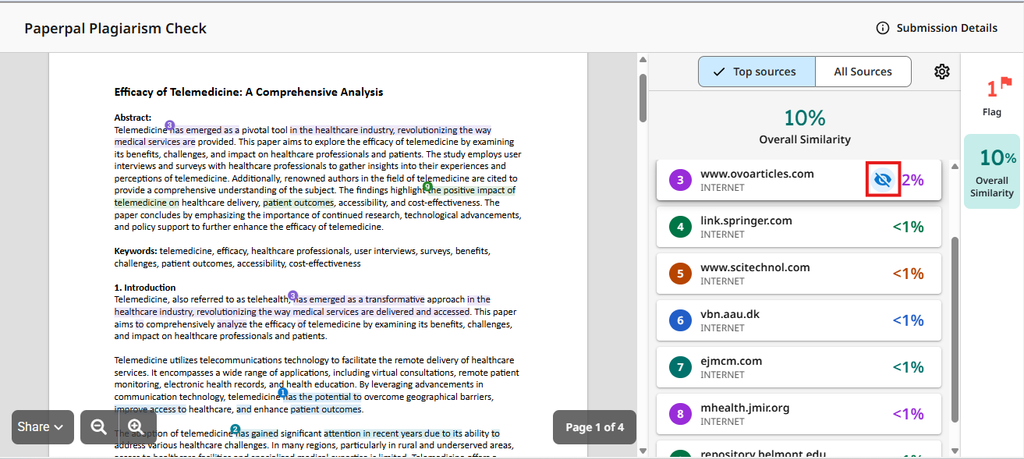
Figure 3b: Paperpal has a comprehensive plagiarism check with a detailed similarity report that provides an overall similarity score, color-coded highlights with sources to help researchers identify and address potential overlaps.
No native AI-detection check
Using AI responsibly in academic writing isn’t just about generating text. Researchers also need to understand how much of a manuscript appears AI-generated and maintain transparency around AI use. Claude has no dedicated manuscript-level workflow for assessing AI influence, which leaves researchers to manually assess it themselves and ask for revisions where needed.
Paperpal’s AI Detection Check provides contextual analysis of AI-written, human-written, and blended text, helping researchers review AI influence across a manuscript and make more informed decisions about responsible AI use.
Manuscript checks require heavy manual prompting
Claude can review a manuscript when researchers provide detailed instructions about what to check. That flexibility is useful, but it also means checking 5 or 6 parameters at a time, front matter, structure, references, and little else, and a comprehensive pre-submission review depends on remembering every parameter yourself.
Paperpal runs 30+ language and technical checks automatically: metadata, figures and tables, manuscript structure, required declarations, references, and language quality. It catches specifics Claude won’t: a missing ethics statement, a manuscript that doesn’t follow the IMRaD structure, a missing plain language summary, all before you ever hit submit.
Citations aren’t linked, in-line, or auto-updating
A Claude-generated research note doesn’t offer linked, in-line citations, automated bibliography generation, or reformatting across citation styles. If a target journal changes its citation requirements, updating every reference is a manual job.
Paperpal manages citations end to end: in-line citations, a dedicated reference library, automatically updated bibliographies, and one-click reformatting across more than 10,000 citation styles.
Where you actually write
Claude lives in a separate chat window. Every insight, edit, or rewrite has to be copied out and pasted back into your manuscript, which risks breaking formatting, citations, and structure along the way. And since there’s no dedicated editor, each pass-through Claude draws on tokens rather than living inside a document you can just keep working in.
Paperpal brings AI-powered writing support directly into Microsoft Word, Google Docs, Overleaf, Chrome, and Edge. Suggestions and edits happen inline, in the document you’re already using, so your original text, citations, and references stay intact.
Manuscript security built for unpublished research
Claude’s Team and Enterprise plans don’t train on user data by default. Its individual Free, Pro, and Max plans do, unless you opt out.
Paperpal is built on ISO/IEC 27001 and 42001 certifications, SOC1, GDPR and FERPA alignment, and HIPAA-readiness, and it never trains on user data, on any plan. For researchers working with sensitive or pre-publication data, that’s not a setting to remember, it’s the default.
Paperpal vs Claude: Which AI tool is the best for your research?
Both Claude and Paperpal can support researchers at different stages of academic work. The real difference is what they’re built to help you accomplish. Claude is genuinely strong at thinking, drafting, and early-stage research. Paperpal picks up from there, its language-editing model trained on 24+ years of academic and STM publishing expertise, built for everything a manuscript needs before it’s ready to submit. Here’s how the two stack up across everything we tested:
| Challenge | Claude | Paperpal |
| Source verification | No built-in way to trace a claim back to its source | Every insight grounded with numbered, clickable citations via Chat PDF |
| Reference auditing | No systematic check for retractions, mismatches, or self-citation | Audits 9 critical parameters and flags issues by severity |
| Plagiarism detection | No dedicated workflow to check for unattributed or duplicated text | Full similarity report with a score, source-level results, and highlights |
| AI-content detection | No manuscript-level workflow to assess AI influence | AI Detection Check flags AI-written, human-written, and blended text |
| Manuscript readiness | Checks 5-6 parameters at a time, needs detailed prompting | 30+ automated checks across structure, metadata, figures, and declarations |
| Citation management | No linked, in-line citations or auto-updating bibliography | In-line citations, dedicated library, and 10,000+ styles with one-click reformatting |
| Editing environment | Separate chat window, edits copied in manually | Native editor inside Word, Google Docs, Overleaf, Chrome, and Edge |
| Data security | Individual plans train on data by default unless you opt out | ISO/IEC 27001+42001, SOC1, GDPR/FERPA, HIPAA-ready, never trains on data |
| Research organization | No persistent place to organize research across a project | Library and Agents keep sources and context connected |
That’s the gap between great research and a published manuscript, and it’s exactly what Paperpal is built to close.
 Paperpal for China
 Paperpal for Korea
 Paperpal for Japan


 Speak to us